Home
项目预览
test_mkdocs
│
├─my_docs
│  │  gen_md_from_src.py
│  │  mkdocs.yml
│  │  readme.md
│  │
│  └─docs
│      │  index.md
│      │  帮助文档.md
│      │
│      └─API
│              fun_1.md
│              fun_2.md
│
└─src
        fun_1.m
        fun_2.py
最终的mkdocs.yml
site_name: Xdd的帮助系统
theme:
  name: material
  palette:
    primary: 'Blue'
  icon:
    repo: fontawesome/brands/github
  features:
    - search.highlight

plugins:
    - search:
        separator: '[\s\u200b\-]'

extra:
  # social:
  #   - icon: fontawesome/solid/paper-plane
  #     link: mailto:xdd2026@qq.com
  generator: false


markdown_extensions:
  - meta                  # 元数据
  - pymdownx.arithmatex:  # 数学公式
      generic: true
  - pymdownx.highlight    # 代码高亮

repo_url: https://github.com/xie-dd/mkdocs
copyright: Copyright © xie-dd
use_directory_urls: false
安装与生成文档
安装与配置 mkdocs
pip install mkdocs
pip install mkdocs-material
cd test_mkdocs
mkdocs new my_docs
由代码脚本的注释生成文档
cd my_docs
python gen_md_from_src.py
启动本地服务器
mkdocs serve
浏览器打开:127.0.0.1:8000
其他问题
本地使用index.html问题
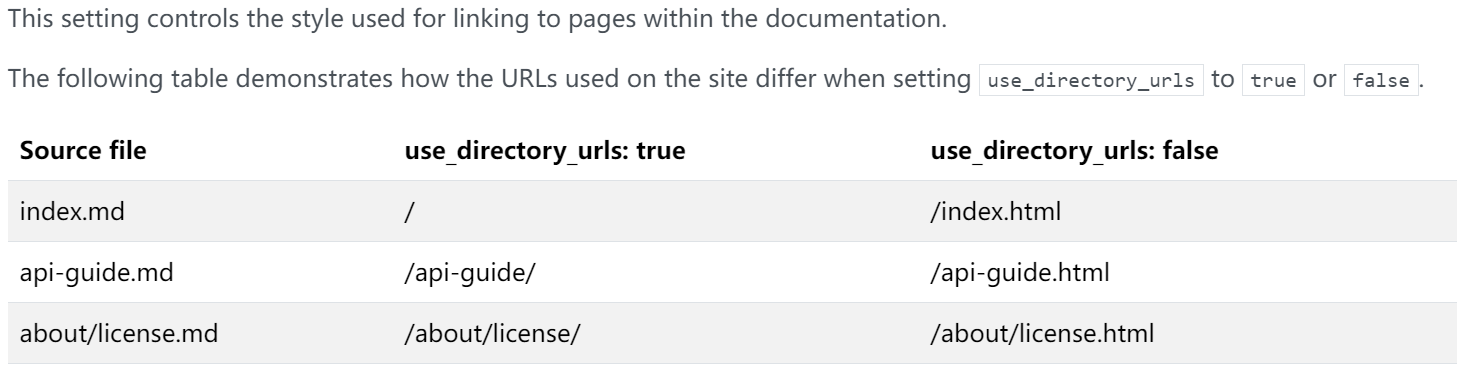
解决方法:添加use_directory_urls关键字
repo_url: https://github.com/xie-dd/mkdocs
copyright: Copyright © xie-dd
use_directory_urls: false
下划线被替换为空格
markdown文件生成的html的文件在侧边导航栏中下划线会被替换为空格
解决方法:在markdown文档中添加title
---
title: A-A.A2
---
中文搜索
- 修改文件 mkdocs.yml,添加plugins-search部分
site_name: Xdd的帮助系统
theme:
  name: material
  palette:
    primary: 'green'
plugins:
    - search:
        separator: '[\s\u200b\-]'
- 安装分词模块:
pip install jieba - 修改文件 mkdocs.contrib.search.search_index.py
def _add_entry(self, title, text, loc):
    """
    A simple wrapper to add an entry and ensure the contents
    is UTF8 encoded.
    """
    import jieba
    text = text.replace('\u3000', ' ') # 替换中文全角空格
    text = text.replace('\u00a0', ' ')
    text = re.sub(r'[ \t\n\r\f\v]+', ' ', text.strip())

    # 给正文分词
    text_seg_list = jieba.cut_for_search(text) # 结巴分词,搜索引擎模式,召回率更高
    text = " ".join(text_seg_list) # 用空格连接词语

    # 给标题分词
    title_seg_list = jieba.cut(title, cut_all=False) # 结巴分词,精确模式,更可读
    title = " ".join(title_seg_list) # 用空格连接词语

    self._entries.append({
        'title': title,
        'text': str(text.encode('utf-8'), encoding='utf-8'),
        'location': loc
    })
部署到 github page
注意:和docsify一样,不用部署到 ***.github.io 仓库
- 把程序上传到Github任意仓库
- 在本地项目执行下面代码,会生成一个site文件夹
mkdocs build
mkdocs gh-deploy --clean
- 登录github--->找到对应仓库--->Settings--->Pages--->Source:Deploy from a branch--->Branch:gh-pages, root--->Save
- 访问 usename.github.io/repo_name 即可。如 xie-dd.github.io/mkdocs
简化提交程序
在mkdocs.yml文件相同目录下添加一个git_push.sh文件,文件内容为:
# @echo off
# python gen_md_from_src.py
mkdocs build
mkdocs gh-deploy --clean

git pull
git add .
read -p "input commit message: " msg
git commit -m "$msg"
# git commit -m 'WIN10'
git push
read -p "===== git push ok, Type enter to exit. ===== " msg00